Showing posts with label scratch. Show all posts

Sunday, 2 August 2020

Project 144: Pushing on with Programming

Programming is one of those activities that we always say we'll do more of, but then never do, in fact it's a year since our last programming project (Project 85: Revisiting Programming). So we decided to have a big three week project focused just on programming: Monica focused on Scratch, and Solomon focused on Python.


They each started with the appropriate "Coding for Beginners..." book from Usborne, before using other books. The Usborne books are really easy to follow, so most of the time the children worked their way through with little help. Coding Games in Python was a little bit trickier, making use of the pygame module, but Solomon soon got the hang of it.

Over the three weeks the children did literally dozens of projects, so we asked them to pick three to illustrate their work. 

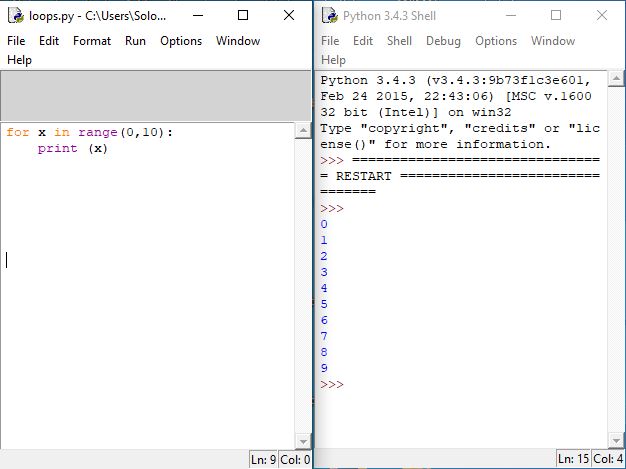
Solomon picked a simple loop:
Dodge the Bombs (a minesweeper-style game) was his favourite game (from Coding for Beginners...):

Although he also enjoyed coming up with questions for his quiz game (from Coding Games in Python):

Monica picked one project from each of her three books: 
Coding for Beginners:
Code your own Space Adventure:
Code your own Jungle Adventure:


Both the children really enjoyed the programming and are keen to do it more often, which we will certainly encourage as it's a good way to get some peace and quiet for a couple of hours!

Next project: Starting a Business!

Monday, 20 May 2019

Project 85: Revisiting Programming

In his first year of home education Solomon programmed in both ScratchJr and Scratch:


Unfortunately programming is one of those activities that all too easily gets overlooked on a week-to-week basis. When programming does appear, it is more likely to appear as a programming language associated with a specific technology (e.g., WeDo Lego, or Minecraft) rather than a full programming language. It therefore seemed a good idea to 'Revisit Programming!', and start Monica on her programming journey.

This week Monica worked her way through The Official Scratch Jr Book, while Solomon did a Code Your Own Pirate Adventure and tried a text-based programming language for the first time with Coding for Beginners Using Python.
This week's course books!

Monica really enjoyed programming in Scratch Jr on the tablet, and while Solomon really enjoyed the Scratch pirate games it is possibly a bit too simple for him now.

One of the criticisms of Scratch (and it may be equally applied to Scratch Jr) is that the ease with which you can make bright colourful games makes more formal languages seem dull in comparison. This means there is a real onus on the educator to emphasise the long-term advantages of Python in comparison to a block-based language.

While Solomon was not overly excited by his fist experience of Python, he nevertheless understands it's potential, and has agreed to stick with it. This was probably helped in part by the fact that the 1980's Usborne programming books are available online, and Solomon could recognise the similarity between him learning Python and his father having learned BASIC, but mostly he's just a child who's very good at delayed gratification - four weeks later and he's still eking out his Easter eggs!!

Next week's project: What is Maths?


Sunday, 18 February 2018

Project 22: More programming in Scratch!

Half-term meant an extremely busy social calendar this week, so we took the opportunity to do some more programming in Scratch rather than a big standalone project.

We continued where we'd left off with in December (Programming in Scratch!) using Usborne's Coding for Beginners using Scratch, and Solomon was soon back up to speed. Particularly nice this week was the fact that Solomon started to create his own sprites (both bitmaps and vector images).
Solomon's Sprites
We plan to use Solomon's interest in computer programming and designing sprites to get him to draw more in the future.

Next week's project: An Ancient World!

Sunday, 17 December 2017

Project 14: Programming in Scratch!

With the days getting colder it seemed a good time to stay in and learn a bit more about computers and coding, especially as Solomon hasn't done much programming since using Scratch Jr in Project 1.

We started by reminding ourselves of the computing and coding fundamentals with Usborne's lift-the-flap Computers and Coding, and Kids Get Coding: Algorithms & Bugs and Kids Get Coding: Learn to Program. We also used a computers and coding activity and sticker book. Usborne have been writing computer and coding books for kids since the 1980s, and I can't recommend them enough as an introduction to the topic. Nonetheless, combining Usborne books with books from another publisher allowed for the consolidation of certain ideas and concepts.

If you want to know what Usborne's computer coding books were like in the 1980s, they've made some of them available online as PDFs.

We used Usborne's Coding for Beginners using Scratch as the main focus of the week's project, working through the first few project's. Solomon's favourites so far have been: Dancing Sprites, and Boo!


Scratch was chosen as it's a drag-and-drop blocks programming language, and Coding for Beginners using Scratch provides a good introduction to the language with 15 increasingly complicated projects. We still have a number of projects left in the book, and some other Scratch programming project books, so we plan to incorporate coding into his regular weekly activities before introducing other languages later.

The problem these days is that with such a wide range of languages and tools available, it is difficult to choose which to introduce next. Our current thinking for next languages is:
- MakeCode For Minecraft
- AppInventor
- Python.

Next week's project: All About Christmas!